
3 Methods to Collect Data with Scarf
Scarf Packages are part of the service that sits in front of your existing software, acting as a single access point to all of your artifacts, regardless of where they are actually hosted. Scarf Packages decouple your distribution from your hosting provider to give you in-depth download analytics. scarf.gateway.scarf.sh

Scarf collects data in 3 ways
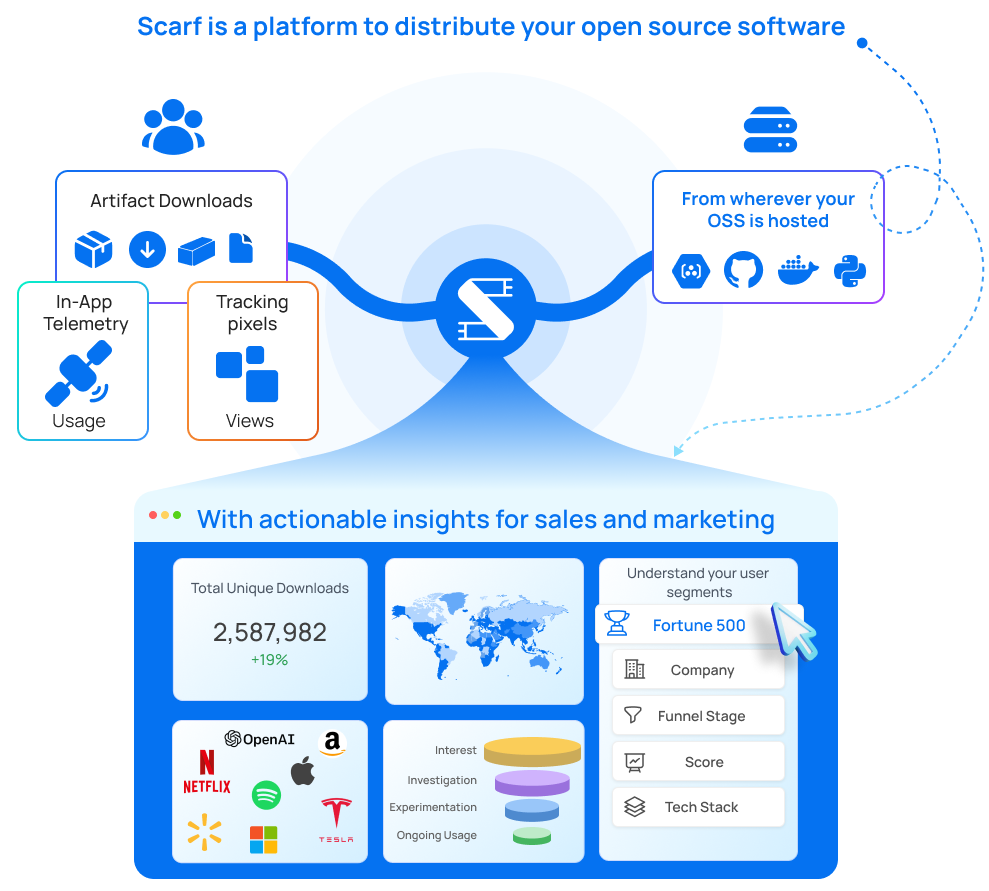
Scarf Packages
Scarf Packages are part of the service that sits in front of your existing software, acting as a single access point to all of your artifacts, regardless of where they are actually hosted. Scarf Packages decouple your distribution from your hosting provider to give you in-depth download analytics. scarf.gateway.scarf.sh
Use a Scarf Package when you want to track:
- Downloads of artifacts: This includes software packages, containers, binaries, or any other downloadable file associated with your project.
- Usage of package managers: Track installs or updates through popular package managers like npm, PyPI, or Maven.
- Adoption and engagement: Understand how often and where your project’s artifacts are being downloaded and used.
Through in-app telemetry
Scarf provides you the ability to collect custom telemetry from within your application by utilizing our API. This data helps users understand how their software is being used across different platforms and configurations.
Use Scarf’s Custom Telemetry feature when you want to track:
- Specific user actions or events within your application: This could include button clicks, feature usage, or completion of specific workflows.
- Unique metrics not covered by packages or pixels: Track any custom behavior or event that’s important for understanding how your open-source project is used.
Tracking Pixels
Scarf uses cookie-free tracking to leverage web traffic from your project’s documentation and other artifacts to learn which companies are using your software. Our pixels specifically do not collect any personally identifiable information (PII).
Use a Scarf Pixel when you want to track:
- Documentation views: See which pages of your documentation are being accessed, how users navigate them, and where they drop off.
- User behavior on your website: Gain insights into how users interact with your project’s website or landing pages.
Onboarding effectiveness: Track how well users progress through onboarding flows or tutorials.
Introducing Dependency Radar
A new real-time supply chain security feed from open source downloads tracked by Scarf
Introducing Scarf's New Pricing Model
Today we are launching a new pricing model for new Scarf accounts going forward, and we'd love your feedback. For customers already on a paid Scarf plan, your billing will not be impacted by this change.
Scarf Go SDK is Now Available
Scarf's Go SDK is now available on GitHub. You can now send telemetry to Scarf from your Golang code more easily than ever, with things like user opt-out being managed for you.
